
 Book a Strategy Call
AI has officially entered the world of web development. Tools like Replit AI can now generate, deploy and host working websites from prompts alone. Meanwhile, WordPress remains the most widely adopted CMS globally — and for good reason. It powers 40.1% of all websites, and 58.6% of sites whose CMS is known (W3Techs, October 2026).
They’re often compared side by side — but they shouldn’t be treated as equals.
At Bend Marketing, we work with faith-based and mission-driven organizations looking for websites that grow with them. In this post, we’ll break down what Replit AI is (and isn’t), how it stacks up to WordPress, and when each makes sense — especially if long-term impact is your goal.
Last checked: October 2026. Replit’s plans change often; see replit.com/pricing for the latest.
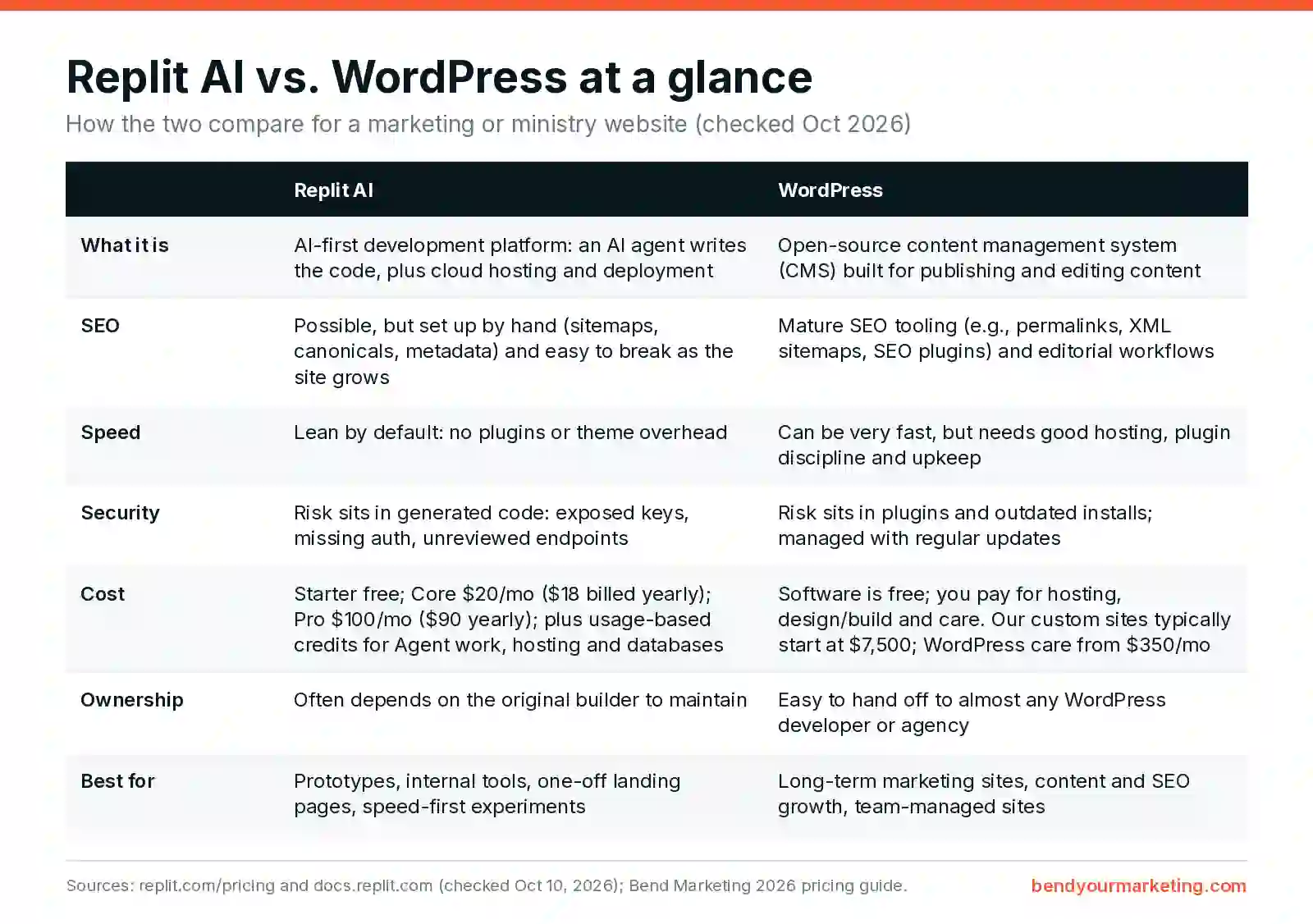
What Is Replit AI?
Replit AI is an AI-first development platform, not a content management system.
It combines:
-
An AI agent that generates code from prompts
-
A cloud-based runtime environment
-
Built-in deployment and hosting
With Replit AI, you can describe a website in natural language and receive a working application — often using modern frameworks like React, Next.js, or Astro.
The tradeoff: Replit optimizes for speed and functionality, not long-term content management or marketing workflows.
What Is WordPress?
WordPress is a mature CMS designed for publishing, editing, and scaling content over time.
It includes:
-
A structured database
-
User roles and permissions
-
Built-in content editing
-
A massive plugin ecosystem
-
Decades of SEO and hosting best practices
WordPress is slower to set up than AI tools — but it’s designed for durability, not experimentation.
WordPress isn’t standing still on AI either. See what’s new in WordPress 7.
Core Difference: Tool vs Platform
This is the key distinction most comparisons miss.
Replit AI
-
A development accelerator
-
Generates code
-
Requires technical ownership
-
No built-in CMS
-
No default SEO system
WordPress
-
A publishing platform
-
Abstracts complexity
-
Designed for non-technical users
-
Strong defaults for SEO and content
They solve different problems.
SEO: Possible vs Proven
Replit AI websites can rank in Google.
But SEO on Replit is:
-
Fully manual
-
Dependent on prompt quality
-
Easy to break as the site grows
WordPress provides:
-
Native permalink structures
-
XML sitemaps
-
Canonicals
-
Pagination
-
Editorial workflows
Google does not rank tools — it ranks structure, consistency, and content systems. WordPress bakes those in by default.
Performance and Bloat
This is where Replit AI shines.
-
No plugins
-
No theme overhead
-
Minimal JavaScript if designed correctly
-
Excellent Core Web Vitals potential
WordPress can be fast, but requires:
-
Careful hosting
-
Plugin discipline
-
Ongoing optimization
Winner: Replit AI (by default)
Security: Different Risks, Not Fewer
WordPress risks:
-
Plugin vulnerabilities
-
Outdated installs
-
Shared hosting compromises
Replit AI risks:
-
Insecure generated code
-
Exposed environment variables
-
Missing auth protections
-
AI-created endpoints with no audit trail
Neither platform is “secure by default.”
Security shifts from ecosystem risk to implementation risk.
On WordPress, most of that risk is handled by keeping plugins, themes and core updated, plus backups and monitoring. That’s what a care plan is for. If you’re a church, ministry or religious nonprofit, see our WordPress maintenance for religious nonprofits.
Hosting and Cost Predictability
WordPress:
-
Fixed monthly hosting costs
-
Easy to pass through to clients
-
Well-understood pricing
Replit AI:
-
Usage-based billing
-
Compute-driven pricing
-
Potential for cost spikes
-
Less predictable margins
This matters when you’re selling websites to clients, not just building your own.
What Replit costs in 2026: Replit has a free Starter plan with a daily Agent allowance and one published app. Core is $20/month ($18/month billed yearly) and Pro is $100/month ($90/month billed yearly). Paid plans include monthly credits that cover Agent work, deployments, storage and databases, and Agent work is priced by effort, so bigger requests use more credits. You can buy more credits when you run out (Replit pricing; Replit docs: plans).
What WordPress costs: The software is free. You pay for hosting, the design and build, and upkeep. Our custom WordPress websites typically start at $7,500 ($5,500 minimum), and our WordPress care plans start at $350/month. All of it is in our rate card.
Client Ownership and Longevity
A WordPress site can be handed off to almost any developer or agency.
A Replit AI site:
-
May lack documentation
-
May have non-obvious architecture
-
Depends heavily on AI-generated decisions
-
Often requires the original builder to maintain
This affects trust, resale, and long-term client confidence.
When Replit AI Makes Sense
Replit AI is a good fit for:
-
MVPs
-
Landing pages
-
One-off marketing sites
-
Internal tools
-
Speed-first, budget-constrained projects
It is not a drop-in replacement for a long-term marketing website.
When WordPress Still Wins
WordPress remains the better choice for:
-
SEO-driven growth
-
Content publishing
-
Client-managed sites
-
Marketing teams
-
Long-term stability
Final Word
Replit AI is not “the next WordPress.”
It’s a powerful tool — but a different one.
WordPress remains the safest, most scalable option for serious websites — especially for growing nonprofits, ministries, and impact-driven brands.
We don’t chase trends. We build platforms that last. See how we approach custom WordPress website design, check pricing in our rate card, or book a strategy call and we’ll help you decide what fits.

